
Education
How to Start Paper Trading on Liquid
Trade real markets with simulated funds. Learn how to turn on paper trading mode, which markets it covers, how to reset your practice balance, and where its limits are.

To start paper trading on Liquid, sign in to your account, open Settings, select the Trading tab, and turn on Paper trading mode. Your account switches to a simulated balance — $10,000 to start — and every order you place fills against live market prices without touching real funds.
Paper trading is the fastest way to learn the trading controls, because the practice environment is the same terminal you will use for real. This guide covers how to turn it on, which markets it simulates, how to reset your balance, and the few things it does not cover. It uses the web layout at app.liquid.trade; mobile layouts and controls can differ.
1. Check which markets paper trading covers
Paper mode simulates the markets that run on Liquid's own trading engine. Search automatically hides unsupported markets while paper mode is on, and if you open one — for example from a saved link — the app moves you to a supported perp market for the same asset instead.
What you can and cannot practice in paper mode
Scroll horizontally to compare
| Market | Paper trading | What to check |
|---|---|---|
| Crypto perps | Supported — BTC, ETH, SOL, and other perpetual markets | Leverage, margin mode, funding, and liquidation estimate |
| Stock, index, commodity, and FX perps | Supported on Liquid's own markets | Trading hours, venue, and live market status |
| Prediction markets | Supported — event contracts with simulated funds | Contract terms, resolution rules, and price as implied probability |
| Crypto spot | Not simulated yet | Switches to a perp market when paper mode is on |
| External venues (Ostium, Lighter, Kalshi) | Not simulated yet | Hidden from search; opening one moves you to a supported market |
2. Turn on paper trading mode
- Sign in to the account you want to practice with.
- Open Settings and select the Trading tab.
- Scroll to Paper trading mode and turn the switch on.
A green PAPER TRADING ACTIVE banner appears across the top of the terminal, and Available to Trade shows your simulated balance instead of your real one. Your real funds are not moved or locked — paper mode only changes which engine your orders go to.
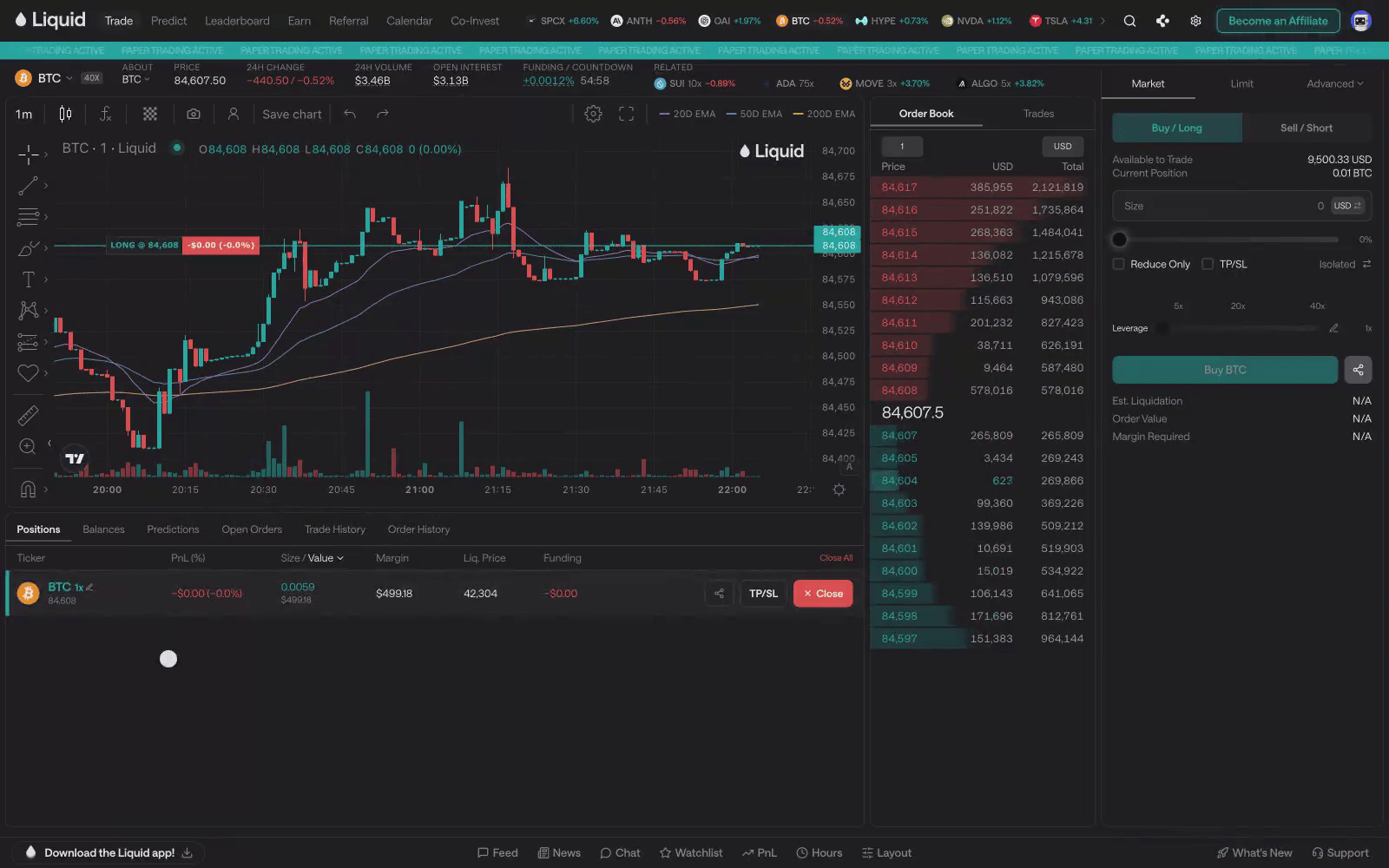
If a paper trading contest is active, the toggle is paused until the contest ends or you leave it — contests take precedence over free paper mode.
3. Place a practice trade
Practice trades use the same order form and the same account tabs as live trading. Pick a market you actually follow, enter a size, and check the margin, leverage, and liquidation estimate before you select Buy or Sell.
- For a full walkthrough of the order form — direction, order types, size and leverage, take-profit and stop-loss, and confirming a fill — follow How to trade on Liquid.
- For event contracts, follow How to trade prediction markets.
After you submit, check Positions for the filled position and Open Orders for anything unfilled. Everything in Positions, Balances, Trade History, and Order History reflects your paper account while the banner is up, so you can practice the full workflow — entry, exits, partial closes — end to end.
4. Reset your practice balance
If your paper account runs low or you want a clean slate:
- Open Settings and select the Trading tab.
- Select Reset balance under Paper trading.
- Confirm the reset.
Resetting wipes your paper positions, orders, and fills and returns the balance to the starting amount. It is permanent — there is no undo. Reset is only available in free paper mode; contest balances are fixed by the contest.
5. Turn it off when you are done
Turn the Paper trading mode switch off in Settings, or press the green banner itself. The banner disappears and Positions and Balances show your real account again. Your paper positions stay stored, so they are still there if you turn paper mode back on.
What paper trading does not teach you
Paper mode fills at live market prices, but it is still a simulation:
- Fills are guaranteed liquidity. A large real order can move the market or fill partially; the simulation assumes your order fills. Real fills can also slip on price.
- The stakes are missing. Reading about a 50% drawdown and watching your own balance drop 50% feel completely different. Practice sizing as if the money were real, or the habits will not transfer.
- Fees and funding are modeled, not exact. Check the live market's rates before assuming a real trade's costs match what you saw in practice.
When the mechanics feel second nature — you can enter, exit, and set stops without thinking — the next step is a small, real position. Follow the funding guide when you are ready, and keep sizes small at first.
Frequently Asked Questions
How do you turn on paper trading on Liquid?
Sign in, open Settings, select the Trading tab, and turn on Paper trading mode. A green PAPER TRADING ACTIVE banner appears across the terminal and Available to Trade shows a simulated balance instead of your real one. Turn it off from the same switch or by pressing the banner.
What can you trade in Liquid's paper trading mode?
Crypto perpetuals, the stock, index, commodity, and FX perps that run on Liquid's own markets, and prediction markets. Crypto spot and markets routed through external venues such as Ostium, Lighter, and Kalshi are not simulated yet — market search hides them while paper mode is on.
How much money do you get in Liquid paper trading?
A simulated balance of $10,000. Positions, orders, and history are tracked separately from your real account, and you can restore the starting amount at any time with Reset balance in the Trading settings.
Can you reset a Liquid paper trading account?
Yes. In free paper mode, open Settings, select the Trading tab, and choose Reset balance. This wipes your paper positions, orders, and fills and restores the starting balance. Reset is not available inside trading contests, whose balances are fixed by the contest rules.
Is paper trading on Liquid the same as a real trade?
Prices, the order form, and the position mechanics are real, but the money is simulated. Fills assume liquidity, so a real order can slip or fill partially where the paper one would not, and fees and funding are modeled rather than exact. Always check the PAPER TRADING ACTIVE banner is off before placing a real order.
Can you paper trade prediction markets on Liquid?
Yes. Prediction markets are available in free paper mode, so you can practice buying event contracts with simulated funds. They are not available inside paper trading contests, where entries are limited to perpetuals.
Educational content only — not investment advice. Trading perpetual futures involves substantial risk and may not be suitable for every investor. Past performance is not indicative of future results.
Keep reading
All articles →
Education
How to Trade on Liquid
Place and manage your first trade on Liquid. Learn how to choose a market, read size and margin, set exit orders, confirm a fill, and close a position.
Education
How to Fund Your Liquid Account
A step-by-step on-ramping tutorial: add money with a card or bank transfer, move crypto from another app or wallet, and check when your funds are ready.
Education
Bitget Alternatives: Best Trading Platforms in 2026
Compare Bitget alternatives by fees, custody, derivatives access, and multi-asset coverage — including a non-custodial, 24/7 option with 50x multipliers.
Put what you learned to work.
Trade crypto, stocks, commodities, FX, indices, and pre-IPO names — plus prediction markets. Prediction contracts are unleveraged; eligible perpetual markets offer multipliers of up to 50×.