
Education
How to Fund Your Liquid Account
A step-by-step on-ramping tutorial: add money with a card or bank transfer, move crypto from another app or wallet, and check when your funds are ready.

To fund your Liquid account, sign in, open Deposit, and choose Cash or Crypto. Cash takes you to the available card, bank, and payment-app options. Crypto lets you send a supported token from another wallet or exchange.
Moving regular money, such as dollars or euros, into crypto is called on-ramping. A payment provider handles the purchase or conversion along the way. If you already own crypto, you can use the Crypto deposit path instead.
This guide follows the web app at app.liquid.trade. The methods you see depend on your location, account, and provider availability. On mobile, labels and layout may differ. Use the options and instructions shown in your own Deposit screen.
1. Sign in and open Deposit
Open Liquid and sign in to the account you want to fund. If you are new, create an account with one of the available sign-up methods. If you already have an account, use your original sign-in method so your deposit reaches the right account.
Select Deposit, or open the deposit screen directly.

Deposit sits in the top bar of the trading terminal
Have your payment method or sending wallet ready. Cash providers may ask for personal details and identity verification before you can continue. Review their terms and complete any requested verification in the provider's flow.
2. Choose where your funds are coming from
Choose a deposit path
Scroll horizontally to compare
| Your funds | Where to start | What to check |
|---|---|---|
| Debit or credit card | Cash → Debit Card or Credit Card | Total charge, fees, and the amount you will receive |
| Apple Pay or Google Pay | An available cash provider, such as Stripe | Whether your device and payment method are supported |
| Bank account | An available ACH, SEPA, or wire option under Cash | Currency, verification, recipient details, and payment reference |
| Another app | External Apps or CashApp, when offered under Cash | The supported source app and payment instructions |
| Crypto wallet or exchange | Crypto → Token and Chain | Exact token, network, address, and deposit minimum |
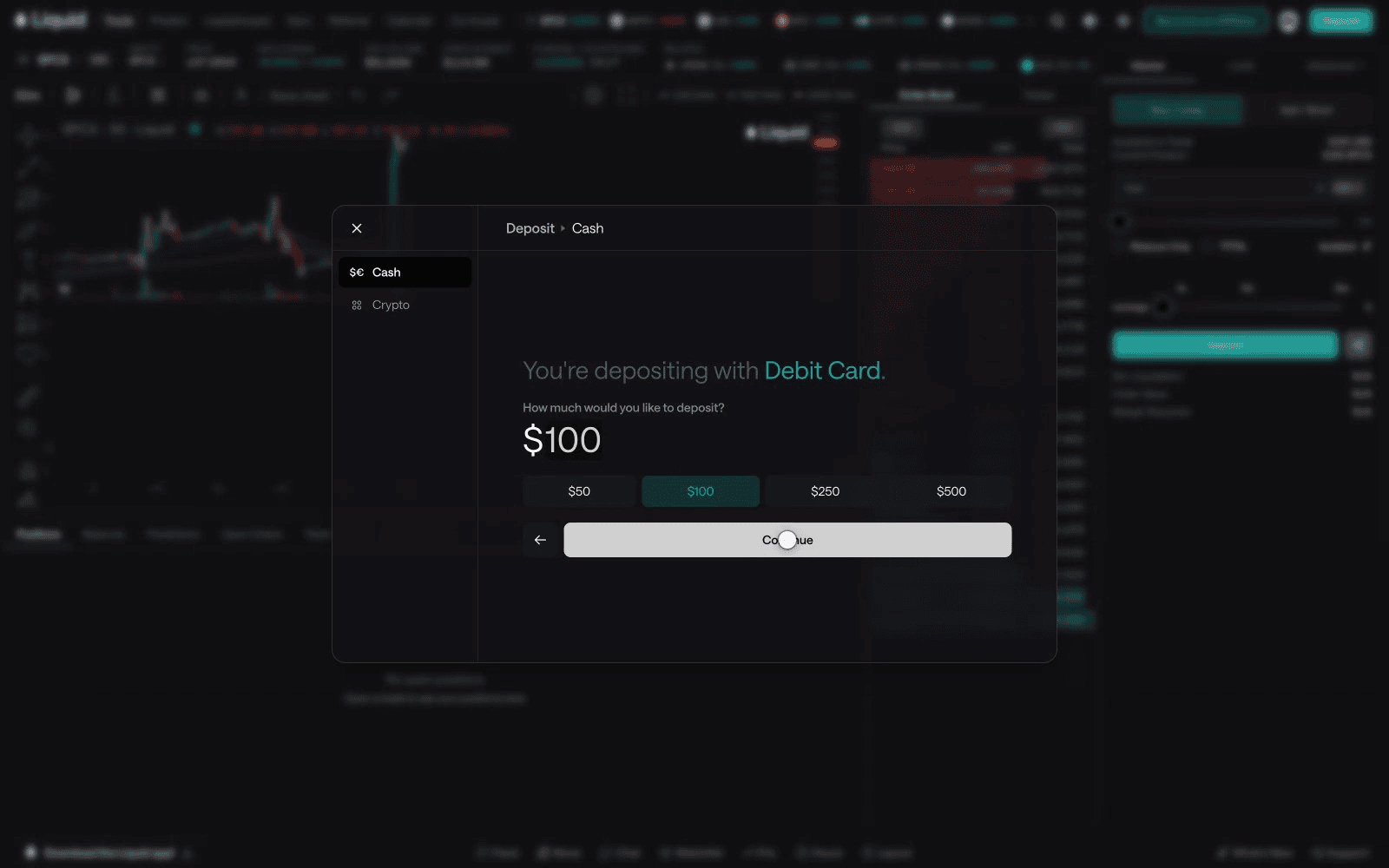
Liquid's funding FAQ lists the supported types of deposit. Availability is specific to your account: if a method is missing, choose another displayed option or contact support.
3. Complete your chosen deposit
Follow the section below that matches your source of funds.
Pay with a card, Apple Pay, or Google Pay
- Select Cash, then Debit Card, Credit Card, or another available provider. Where Stripe is offered, its checkout may include Apple Pay or Google Pay on supported devices.
- Enter the amount you want to deposit. Check the minimum shown for that method, then select Continue.
- Complete the checkout that opens inside Liquid or in a separate provider window. Add your payment details and finish any verification the provider requests.
- Review the currency, total charge, fees, and crypto amount you will receive. Your payment amount and the amount credited can differ because of fees or conversion.
- Confirm the payment when the details are correct. Keep the receipt or payment reference, then return to Liquid to check the deposit status and balance.
If the provider window does not open, check whether your browser blocked it and use the option to reopen checkout. Check an existing payment's status before starting a new one.
Transfer from a bank account
- Under Cash, choose an available bank method: ACH for USD, SEPA for EUR, or wire for USD.
- Complete the bank provider's verification and terms steps. If verification is under review, wait for approval before continuing.
- Enter your deposit amount and review the transfer instructions generated for that deposit.
- In your banking app, use the exact recipient, account or IBAN, currency, and payment reference shown. Use the matching transfer type: ACH, SEPA, and wire instructions are not interchangeable.
- Send the transfer and retain your bank confirmation. Return to Liquid to follow its status until the funds are credited.
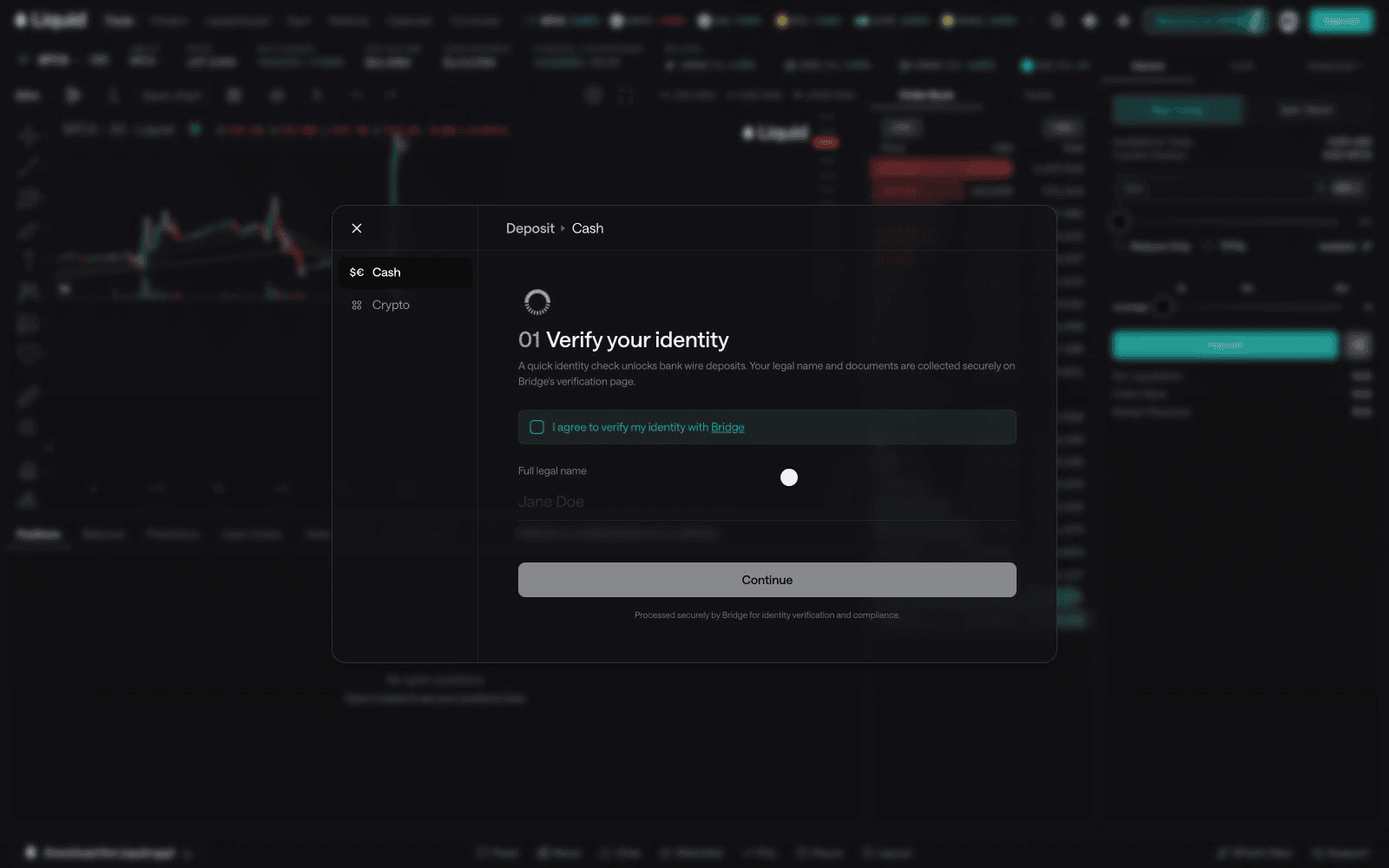
Follow any instructions about the sender's account name, minimum amount, and transfer deadline. Bank processing and verification can affect arrival time; use the estimate for your selected method.
Move funds from another payment or crypto app
Under Cash, select External Apps to see the supported source apps, or CashApp if that option is available. Enter an amount, continue to the provider, and follow the instructions for the app you select. Review the amount and fees before approving the payment there.
You can also withdraw supported crypto from an exchange using the Crypto path below. The exchange's withdrawal network must match the chain selected in Liquid.
Send crypto from a wallet or exchange
- Select Crypto in Deposit.
- Choose the Token you will send and the Chain you will send it on. Only use a combination offered by the app.
- Read the minimum-deposit and network notices. Acknowledge them to reveal the deposit address and QR code.
- Copy that address into the send or withdraw screen of your wallet or exchange. Select the same token and network there, then compare the pasted address with Liquid's address.
- Enter the amount. Account for withdrawal or network fees so the amount arriving still meets the deposit minimum. If you make a small test transfer first, it must also meet that minimum.
- Review and confirm the transfer in your sending app. Save the transaction hash and wait for Liquid to credit the deposit.
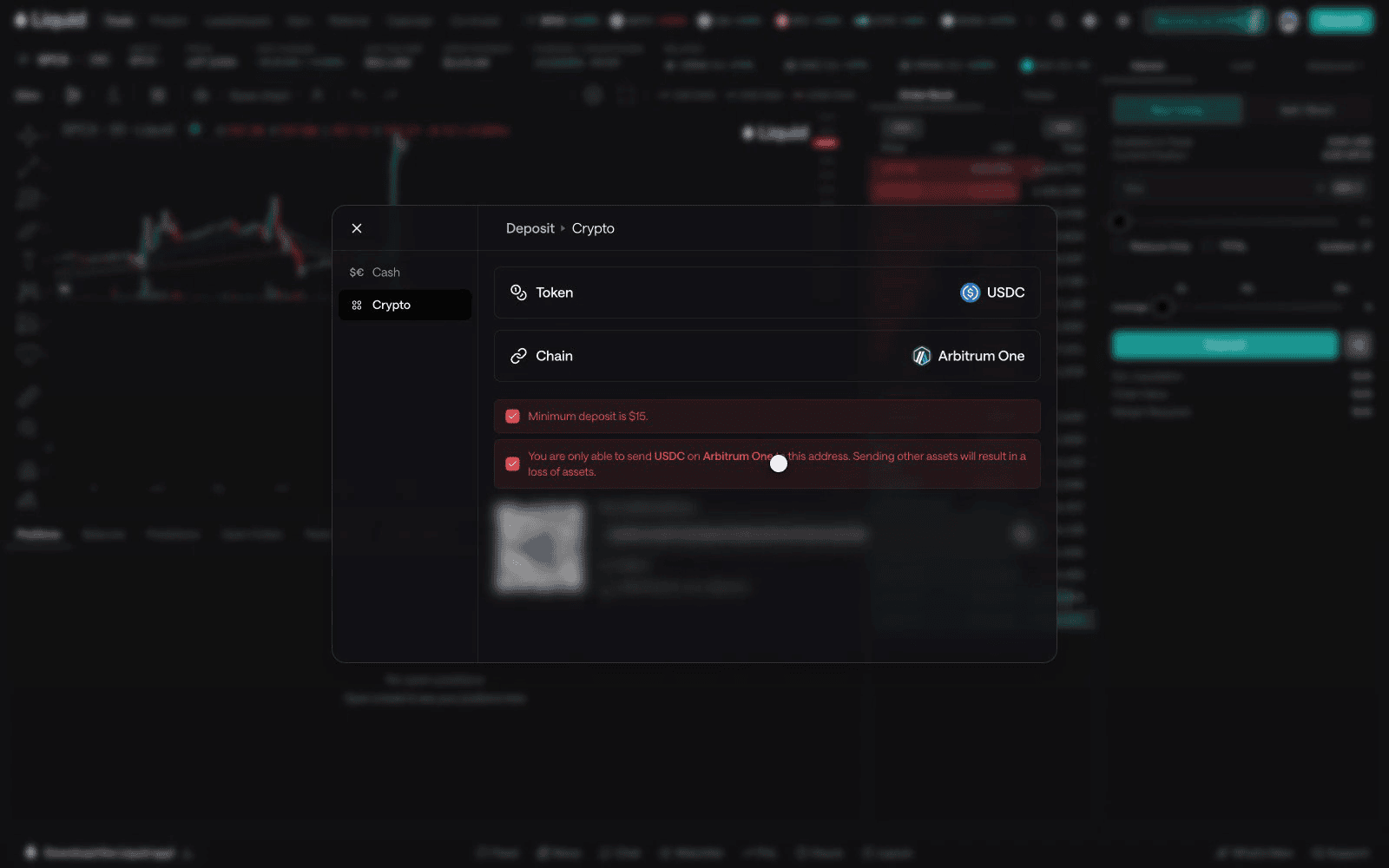
For example, if you choose USDC on Base in Liquid, select USDC on Base at the sending exchange too, provided that combination is available in both apps. USDC on another network is a different transfer route.
4. Confirm your funds have arrived
Return to Liquid and check the deposit status and your balance. A card payment being approved, a bank marking a transfer as sent, or a blockchain confirming the first transaction does not necessarily mean the full deposit route has finished.
Wait for the funds to appear in Liquid. Before placing an order, check the amount Available to Trade for the market you have selected. If the app asks you to enable trading, review and complete that setup separately.
Your credited balance is the useful number to check against the quote. Keep the payment receipt or transaction hash until you have confirmed that the deposit arrived.
If your deposit needs attention
- The payment method is missing: check the methods available after signing in. Your location, account setup, or provider eligibility may limit the choices.
- Continue is disabled: check the amount, displayed minimum, and any incomplete verification or required fields.
- A card payment is declined: read the provider's error and check with your card issuer. Confirm whether the attempted payment failed or is still pending before trying again.
- A bank transfer is delayed: compare the currency, recipient details, and reference with the instructions for that deposit. Keep the bank confirmation available.
- Crypto was sent but has not arrived: check the transaction hash in the sending wallet or exchange, then compare its token, network, destination, and received amount with Liquid's instructions.
- The provider says complete but Liquid has not credited it: check Liquid's status and the displayed arrival estimate. If it remains unresolved, contact support before sending a replacement deposit.
Open Liquid support or use Support in the app. Include the method, amount, approximate time, and payment reference or transaction hash so the team can investigate. Never send a recovery phrase, private key, password, or one-time sign-in code.
Once your balance is credited, your account is funded. If you are still learning the trading controls, the beginner guide explains how to practice with simulated funds first.
Frequently Asked Questions
What does on-ramping mean?
On-ramping means converting regular money, such as dollars or euros, into crypto. In Liquid, start with Deposit and choose Cash to see available payment methods. If you already own crypto, choose Crypto to send a supported token from a wallet or exchange.
How do I deposit money into Liquid?
Sign in to the account you want to fund and open Deposit. Choose Cash for available card, bank, and payment-app methods, or Crypto to select a token and chain and get deposit instructions. Complete the selected flow and check that your balance has been credited.
What is the minimum deposit and how much are the fees?
Minimums and fees depend on the selected method, provider, token, and network. Read the current minimum and quote in the deposit flow before confirming. For crypto transfers, account for sending fees so the amount arriving still meets the displayed minimum.
How long does a Liquid deposit take?
Use the arrival estimate shown for your selected method. Provider verification, bank processing, blockchain confirmations, and any further routing can affect timing. A payment being sent is not the same as a completed deposit; check the status and credited balance in Liquid.
Why can I not see every deposit method?
Deposit methods vary by location, account setup, device, and provider availability. Sign in and use an option shown in your Deposit screen, or contact Liquid support if you need help finding an available method.
Educational content only — not investment advice. Trading perpetual futures involves substantial risk and may not be suitable for every investor. Past performance is not indicative of future results.
Keep reading
All articles →
Education
Bitget Alternatives: Best Trading Platforms in 2026
Compare Bitget alternatives by fees, custody, derivatives access, and multi-asset coverage — including a non-custodial, 24/7 option with 50x multipliers.
Education
Bybit Alternatives: Best Trading Platforms in 2026
Compare Bybit alternatives by fees, custody, derivatives access, and multi-asset coverage — including a non-custodial 24/7 option with 50x multipliers.
Education
dYdX Alternatives: Best Perpetual Trading Platforms in 2026
Compare dYdX alternatives by fees, custody, and market coverage — Liquid, Bybit, OKX, and Kraken versus the dYdX crypto perp DEX.
Put what you learned to work.
Trade crypto, stocks, commodities, FX, indices, and pre-IPO names — plus prediction markets. Prediction contracts are unleveraged; eligible perpetual markets offer multipliers of up to 50×.